
Just when you think you have WordPress completely figured out, it loves to throw a visual curveball at you.
This week, I finally solved my disappearing blog post mystery, clicked over to my live site to celebrate, and was greeted by a brand new nightmare: my titles were completely crashing into themselves.
Lines of text were overlapping like a scrambled puzzle. It looked broken, unprofessional, and entirely unreadable.
If your titles look like they’ve been shoved into a trash compactor, here is the quick, non-techie reason it happens and the 10-second setting that fixes it permanently.
The Problem: When Good Themes Have Bad Defaults
When you look at a summary feed of your blog posts, your theme tries to apply its default text styling to a layout with tight columns. If the font size is large but the hidden setting called Line Height is set too low (or to zero), the words have nowhere to go.
Instead of wrapping cleanly to the next line, the second line of text just climbs right on top of the first one.
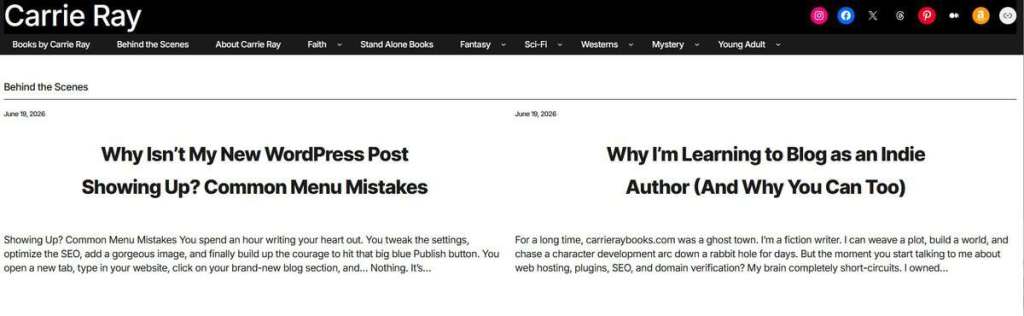
Here is exactly what my live category page looked like when the theme text glitched:

It wasn’t just a live error either; it showed up right in the backend editor blocks.
The 10-Second Fix: Adjusting Your Line Height
You don’t need to learn code or switch your website theme to fix this. WordPress has a hidden slider built right into the design dashboard that forces text lines to separate.
Here is how to find it and fix it step-by-step:
- Go to your WordPress dashboard and click on Appearance > Editor (or click Edit Site at the top dark bar of your live page).
- Click directly onto one of your overlapping title blocks so it is highlighted.
- Look at the right-hand sidebar settings panel under Typography.
- Find the box labeled Line Height.
- Change that number to 1.7 (or use the “+” button to bump it up).

The second I changed that value to 1.7, it explicitly forced WordPress to drop a baseline of breathing room between the lines of text.
Save your changes, refresh your live site, and your titles will instantly separate into clean, perfectly spaced headers.
Are your WordPress theme fonts behaving themselves, or are you fighting text overlaps on your site too? Drop your tech frustrations in the comments below and let’s troubleshoot them together!